Virtual Try-On for Shopify Fashion Stores: A Practical Guide.
Fashion shoppers want more confidence before they buy online. Product photography, measurements, reviews and clear returns policies all help, but they do not always answer the most immediate question: “How will this look on me?”
This guide explains what virtual try-on is, how it fits into a Shopify store, what brands should check before introducing it, and how OptiDress helps fashion retailers offer a more visual shopping experience.
Why shoppers hesitate to buy fashion online
Buying a garment online means buying without trying it on. However good the photography, the shopper is still asked to imagine the item on a body that is not theirs, and to commit a size on that guess.
Virtual try-on gives shoppers another way to explore fashion products before purchasing. For Shopify fashion stores, it adds an interactive layer to the product experience without requiring a new storefront or a separate shopping journey.
What is virtual try-on?
Virtual try-on lets shoppers preview how a fashion item may look when worn. With OptiDress, the shopper creates a 3D digital twin from their height, weight and body type (plus their measurements if they want more precision) and sees the garment worn on that twin, from several angles.
The purpose is not to replace product photography, garment measurements or fit information. Virtual try-on gives shoppers an additional reference point while they decide whether a product suits their style and needs, particularly useful where appearance, silhouette, color and styling drive the purchase decision.
Why Shopify fashion stores are adding it
It adds context to the product page. A product image shows how an item looks on a model. Virtual try-on shows the item in relation to the shopper's own appearance. This is especially relevant for dresses, tops, outerwear, occasionwear and other visually distinctive pieces.
It supports more confident exploration. Shoppers compare several products before deciding. An interactive try-on helps them answer questions a static image cannot: Does this color suit me? How might this style look when worn? Which of these products should I consider first?
It works alongside your existing content. Images, descriptions, size guides and reviews all remain important; the try-on sits next to them as an additional product interaction. With OptiDress, no new production photo shoot is required to get started.
Where it fits in the Shopify customer journey
A useful try-on experience should feel like part of the store, not a disconnected tool. A typical journey looks like this:
- A shopper discovers a product.
- They review the product images and information.
- They open the virtual try-on experience.
- They explore how the product looks when worn.
- They return to the product page with a clear idea of the fit.
- They select their size and add the product to the basket.
The important principle: make the feature easy to find, easy to understand and easy to use, without interrupting the path to purchase. OptiDress lives on the product page, before add-to-cart, so the journey stays intact.
Try-on and size recommendation are not the same thing
Visual appearance and physical fit are related, but they are not the same question. Virtual try-on answers “how does it look on me?”; size recommendation answers “which size should I order?”.
OptiDress includes OptiSize as an integrated size recommendation feature, part of the OptiDress experience, not a separate product. For each garment, OptiSize crosses the shopper's data with the product's real measurements, fabric and cut, and recommends the size with a fit description.
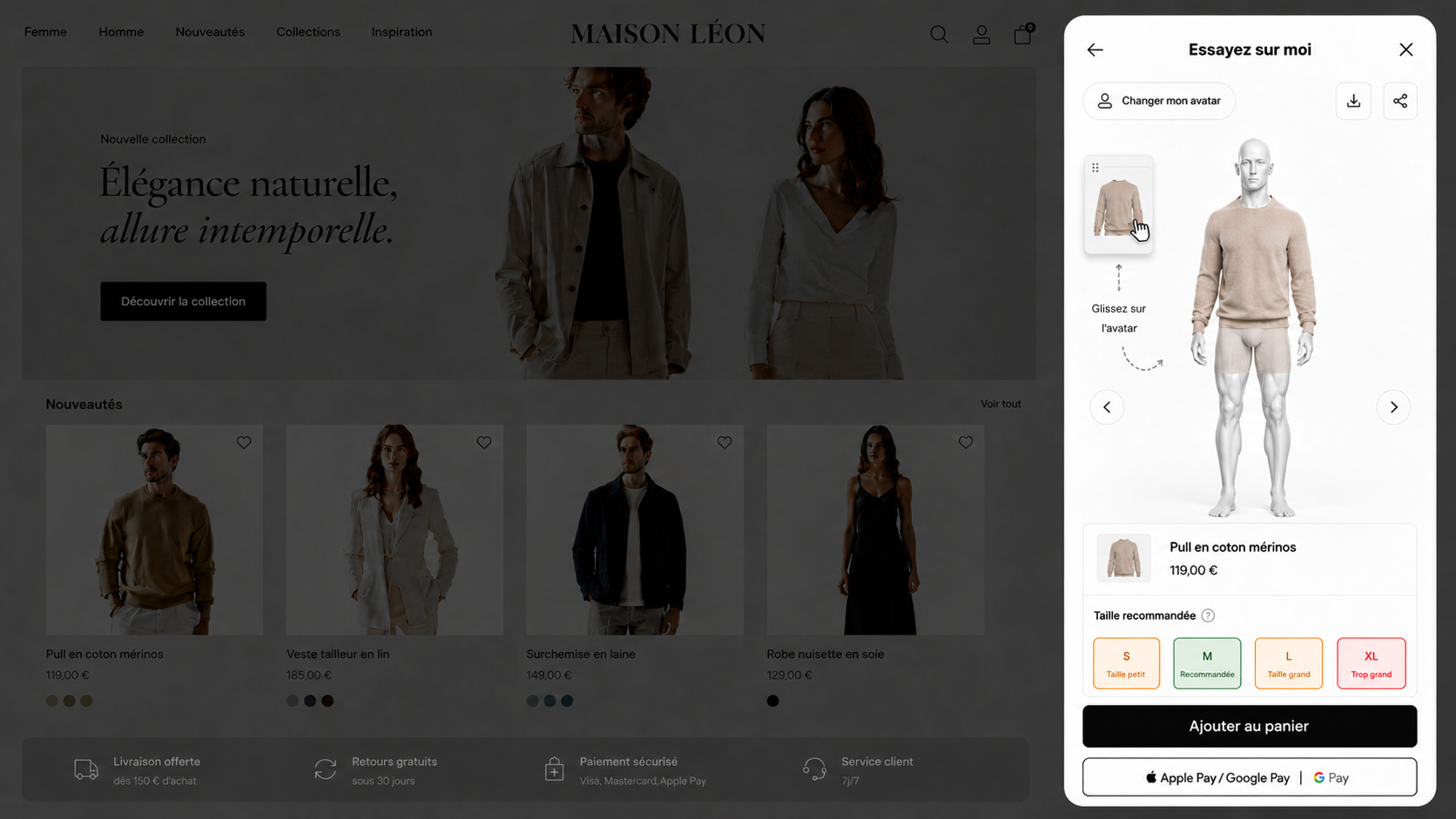
Brands should continue to provide accurate product data and clear sizing information: the recommendation works best when it complements the store's existing fit guidance, rather than replacing it.
What to check before you launch
Product suitability. Not every product needs the same support. Start with products that have a strong visual styling component, are frequently compared with similar items, and sit at an important point of your customer journey. A focused first selection makes the experience easier to review.
Product information quality. The try-on should rest on accurate data. Before launch, review product names, descriptions, color information, size details, imagery and variant information. Clear information helps shoppers interpret the result in the right context.
Placement on the product page. The feature should be visible without competing with the main purchase action, near the product imagery or close to the size selector, with a label shoppers instantly understand: “Try it on” or “See it on you” beats any technical term.
Mobile experience. Fashion shopping happens largely on mobile. Check that shoppers can find the feature, understand what to do, complete the experience without friction and return to the product page to continue toward purchase. The OptiDress experience works on mobile as on desktop.
How to get started with OptiDress on Shopify
OptiDress is a native Shopify app, installed from the Shopify App Store like any other app, with no script to add and no new photo shoot. The launch itself comes down to a few decisions: which products to start with, where the try-on sits on the product page, how you announce it to shoppers and what you measure afterwards. Our step-by-step guide to adding virtual try-on to Shopify walks through each of them.
Why a native Shopify integration matters
A native integration lets a fashion brand add a new product experience without rebuilding its store. For Shopify merchants, the practical questions are installation effort, compatibility with the existing storefront, time to launch and day-to-day operations.
OptiDress is designed to be installed through the Shopify App Store and set up independently, from evaluation to launch without a lengthy implementation project. The experience is customizable to blend into your store, in your brand's colors.
Selling on another platform? OptiDress also supports WooCommerce, SHOPLINE, Magento, PrestaShop, BigCommerce, Wix, Squarespace, Webflow, Shopware, Salesforce, Centra and custom-built sites, see all integrations.
Common mistakes to avoid
- Treating try-on as a replacement for product content. It complements photography, descriptions, measurements and reviews, it does not replace them.
- Hiding the feature. If shoppers cannot find the try-on option, they cannot use it. Make it visible and explain its purpose simply.
- Making unsupported fit claims. Visualization and fit are different; never present a visual result as a guarantee of fit or purchase outcome.
- Skipping the mobile check. A journey that works on desktop may still need review on the devices your customers actually use.
- Presenting OptiSize as a separate product. OptiSize is the integrated size recommendation inside OptiDress, one experience, one integration.
Is virtual try-on right for your fashion store?
It is worth considering if your brand sells visually led fashion products, wants more context on its product pages, prefers a Shopify-native, self-service setup, and does not want to arrange a new photo shoot.
The best way to assess suitability is to look at your catalog, your customer journey and the questions shoppers ask before purchasing, then try the experience on your own products.
Add virtual try-on to your Shopify store
For Shopify brands, OptiDress offers a native App Store integration, self-service installation and an experience that includes OptiSize for size recommendations.
Frequently asked questions.
What is virtual try-on for Shopify?
A product experience that helps shoppers preview how a fashion item may look when worn, added to a Shopify store alongside existing images, descriptions, reviews and sizing information.
How do I add virtual try-on to my Shopify store?
Through the Shopify App Store, like any Shopify app, with a self-service installation. Our guide to adding virtual try-on to Shopify covers each step.
Do I need a new photo shoot?
No. OptiDress works from your existing visuals and your garments' real data, no new production photo shoot is required.
Is OptiSize a separate product?
No. OptiSize is the integrated size recommendation feature within OptiDress: it supports size selection as part of the broader try-on experience.
Does virtual try-on guarantee the right size?
No. The try-on helps shoppers visualize the product, while the size recommendation and your size guide support the size decision. Keep providing accurate measurements and fit information.
Can I install OptiDress without a developer?
Yes. OptiDress is available on the Shopify App Store and supports self-service installation, with no script to add and no technical handling on your side.
Does OptiDress support platforms other than Shopify?
Yes: WooCommerce, SHOPLINE, Magento, PrestaShop, BigCommerce, Wix, Squarespace, Webflow, Shopware, Salesforce, Centra and custom-built e-commerce sites, alongside Shopify.
How should I introduce the feature on my product pages?
Use clear, customer-friendly language (“Try it on”, “See it on you”) placed near the product imagery or the size selector, while keeping the main purchase action obvious.
How can I learn more about OptiDress?
Install the app for free from the Shopify App Store: ten try-ons per month, no card required. You can also visit the OptiDress product page, explore the Maison Léon demo store, or book a 20-minute demo to discuss your store and customer journey.