Anywear: AI virtual try-on, live through the camera.
Anywear is a live virtual try-on made by Decart (Decart.AI, Inc.): the shopper turns on their camera and sees themselves wearing the garment in AI-generated video, moving in real time, with no photo to upload. It comes as a free Chrome extension for shoppers and as one line of script for online stores.
This page sorts out the products that carry the name, explains what the video shows and what it does not say, and compares live video try-on with try-on on a 3D avatar for a fashion brand. Every fact was read on the publishers' own pages on November 27, 2026; sources are listed at the bottom.
Several products, one name.
Searching for "Anywear" brings up several try-on products that are not made by the same company. Here they are, from what each publisher shows.
| Product | Publisher | What it is | Price shown |
|---|---|---|---|
| Anywear | Decart.AI, Inc. | Chrome extension for shoppers (drag a garment from any online store onto yourself, camera on) and a widget for stores, powered by Decart's real-time model Lucy | Extension "free during Beta"; for stores, free to trial, then contact with Decart |
| Anywear Pro | EchoSub AI, LLC, which states it is not affiliated with Decart | Web studio and desktop Chrome extension: camera on, add a clothing image, live AI video | Free demo up to 20 seconds, then $1.99 for 60 seconds or $4.99 for 5 minutes, no subscription |
| Anywear: Live Virtual Try-On (Android) | Fuzen Infoway, according to Google Play; Decart is not named on the listing | Phone app: camera on, pick a clothing photo or paste a shop link | First 10-second try-on free, then Anywear Plus (weekly) or Anywear Pro (monthly) subscriptions |
Read on November 27, 2026 on each publisher's site and store listing. On this page, "Anywear" without a qualifier means Decart's product.
A video of you, generated as you move.
With the extension, the shopper turns on the camera, then drags a garment from a product page onto their own image; the garment appears on them in a video generated in real time. Decart advises taking off a thick jacket or outer layer for the most accurate result. On a store that installs it, a Try-On button appears on product pages, on mobile and desktop; the extension itself only installs on a computer. Decart says the try-on is powered by Lucy, its real-time try-on model, and that the button only appears on garments that render well.
What impresses is the movement. Most try-ons show a single still image; here the shopper turns, raises an arm, and the garment follows, with fabric that moves. They see it on their own face and body, in their own room, with no wait, and Decart notes that shoppers can share the resulting video.
What it does not say is the size. Decart's Anywear pages do not mention size recommendation (not mentioned on its site as of November 27, 2026). Anywear Pro, a separate service working on a similar principle, writes that its previews "do not measure fit" and sends shoppers to the seller's measurements and size chart; the Android app warns that fit, size and colour may differ from the real garment. The video shows how a garment looks on you; it does not tell you whether an M or an L will fit.
Live video or 3D avatar: two ways to try on.
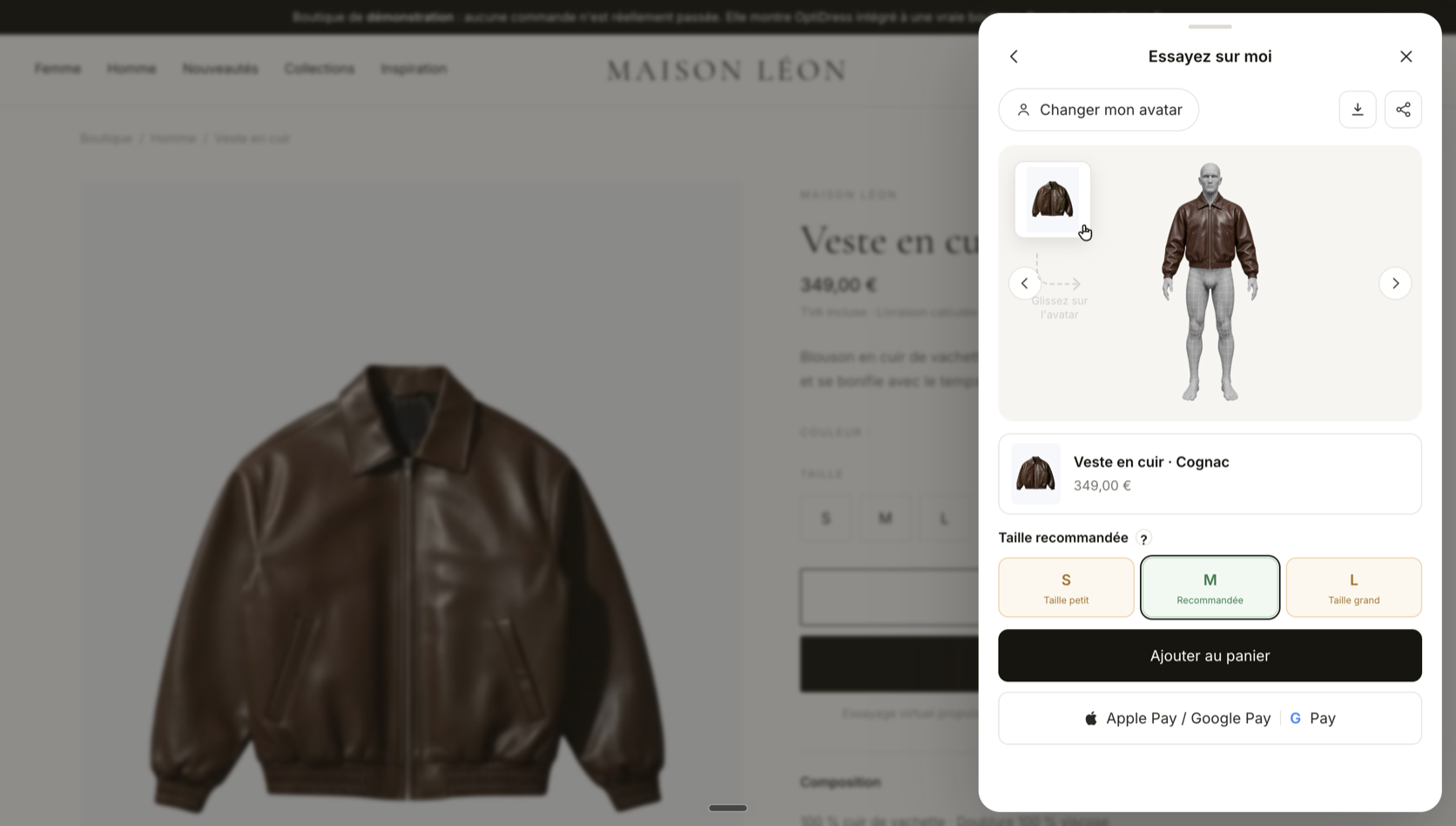
A fashion brand can offer two kinds of virtual try-on. Live video try-on, like Anywear, films the shopper and generates the garment on them in real time: it is about the look. Try-on on a 3D avatar, like OptiDress, builds the shopper's body from a few numbers, with no photo and no camera, shows the garment worn on it, then OptiSize recommends a size for each garment from the brand's size chart and garment measurements, inside the OptiDress interface.
| Live video try-on (Anywear by Decart) | 3D avatar try-on (OptiDress) | |
|---|---|---|
| What the shopper provides | Their live camera video, and the garment they choose | Height, weight and body shape, with five optional measurements, in any unit (cm and kg, or feet, inches and pounds); no photo, no camera, no account |
| What the shopper sees | An AI-generated video of themselves wearing the garment, moving in real time | The garment worn on their 3D avatar |
| Size | Size recommendation not mentioned on its site as of November 27, 2026* | A recommended size for each garment, with the other sizes explained, from the brand's size chart and garment measurements |
| Personal data | Decart's privacy policy lists live video and audio recordings among the data collected, used to deliver the result and also to improve its products and for research; kept until deleted, no fixed period stated* | No photo and no video; the avatar is kept for 30 days on the store |
| Catalogue | Covers "the majority of fashion catalogues" according to Decart; the button only shows on garments that render well | The garments the brand sets up, with their measurements per size |
| Integration | One line of script on any site, including WooCommerce; the Shopify listing says the app is not currently available on the Shopify App Store* | Shopify app, WooCommerce plugin, script on other platforms |
| Price shown | Free to trial for stores, "not to serve all your shoppers"; no price published for opening it to everyone* | Free (10 try-ons a month), then $19.99, $149 and $499 per month |
*Read on November 27, 2026 on anywear.decart.ai, its page for stores, Decart's Shopify listing and Decart's privacy policy (updated August 20, 2026, the policy linked from the Anywear site; it covers Decart's image and video models as a whole). What a publisher does not publish may still exist. Engagement figures published by Decart are not repeated here.
The two approaches can work together. Live video answers "how does it look on me?" in a few seconds of camera; the avatar answers "which size should I order?" without filming anyone, and stays available on the store for 30 days. A brand that wants both the look and the size can offer both; one that does not want to ask shoppers to turn on their camera can rely on the avatar. To compare the other options for a Shopify store, see virtual try-on apps for Shopify, and for the basics, what virtual try-on is.
Frequently asked questions.
What is Anywear?
Anywear is a live virtual try-on made by Decart (Decart.AI, Inc.): the shopper turns on their camera and sees themselves wearing a garment in AI-generated video, in real time. It comes as a free Chrome extension for shoppers and as a script that online stores can install.
Is Anywear free?
On November 27, 2026, the Anywear Chrome extension was shown as free during its beta, and installing it on a store was free to trial; Decart asks stores to contact its team to open it to all their shoppers and publishes no price for that. Anywear Pro, a separate service not affiliated with Decart, charges $1.99 for 60 seconds of live try-on.
Does Anywear tell me my size?
Decart's Anywear pages do not mention size recommendation as of November 27, 2026. Anywear Pro states that its previews do not measure fit and advises using the seller's measurements and size chart. A store that wants to recommend a size for each garment needs a size recommendation tool, such as OptiSize in OptiDress.
Is Anywear safe, and what happens to my camera video?
Anywear links to Decart's privacy policy, updated August 20, 2026. It lists live video and audio recordings among the data collected when you use Decart's video model, used to deliver the result and also to improve its products and conduct research. It sets no fixed retention period: data is kept until Decart deletes it or you ask for deletion.
Is Anywear available on the Shopify App Store?
Decart's Shopify listing, "Anywear - Live Video Try-On", read on November 27, 2026, says the app is not currently available on the Shopify App Store. Decart's page for stores offers a line of script instead, which also works on WooCommerce and other sites.
What are the Anywear alternatives for Shopify stores?
Other virtual try-on apps for Shopify start from a shopper photo or, like OptiDress, from a 3D avatar built from height, weight and body shape, with no photo or camera, and a recommended size for each garment. OptiDress has a free plan with 10 try-ons a month, then plans at $19.99, $149 and $499 per month.
Is Anywear Pro the same as Anywear?
No. Anywear Pro is operated by EchoSub AI, LLC, which states that it is not affiliated with Decart or with the official Anywear extension. It works on a similar principle, live camera video, and is paid by the minute.
Read on November 27, 2026.
Method: every fact on this page comes from the publishers' own pages and store listings, read on November 27, 2026, listed below. OptiDress publishes this page and makes one of the two approaches compared; it does not rank the products. Anywear is a product of Decart.AI, Inc.; Anywear Pro is a service of EchoSub AI, LLC.
- Anywear by Decart: Chrome extension page
- Anywear by Decart: page for stores
- Chrome Web Store listing "Anywear: Live Virtual Try-On"
- Shopify listing "Anywear - Live Video Try-On"
- Decart's privacy policy (updated August 20, 2026)
- Anywear Pro (EchoSub AI, LLC): home page
- Anywear Pro: privacy policy
- Google Play listing "Anywear: Live Virtual Try-On" (Fuzen Infoway)
See also: Virtual try-on apps for Shopify · Virtual try-on without a photo · What is virtual try-on? · Size recommendation: how to choose a solution
Page established on November 27, 2026 from publicly available information. Anywear and Lucy are names used by Decart.AI, Inc.; Anywear Pro by EchoSub AI, LLC. This information may change; please report any inaccuracy to contact@optidress.fr.